vue
panelforge / built_with / vue
Original type: unknown (null)
Explore the panel-forge Laravel+Vue codebase
User wording in a discussion of live prompt modes and costing.
A studio, an engine room, a memory observatory. Six connected places for the projects and the tools behind them.
A designed map of personal projects, with actual product screenshots and recordings.
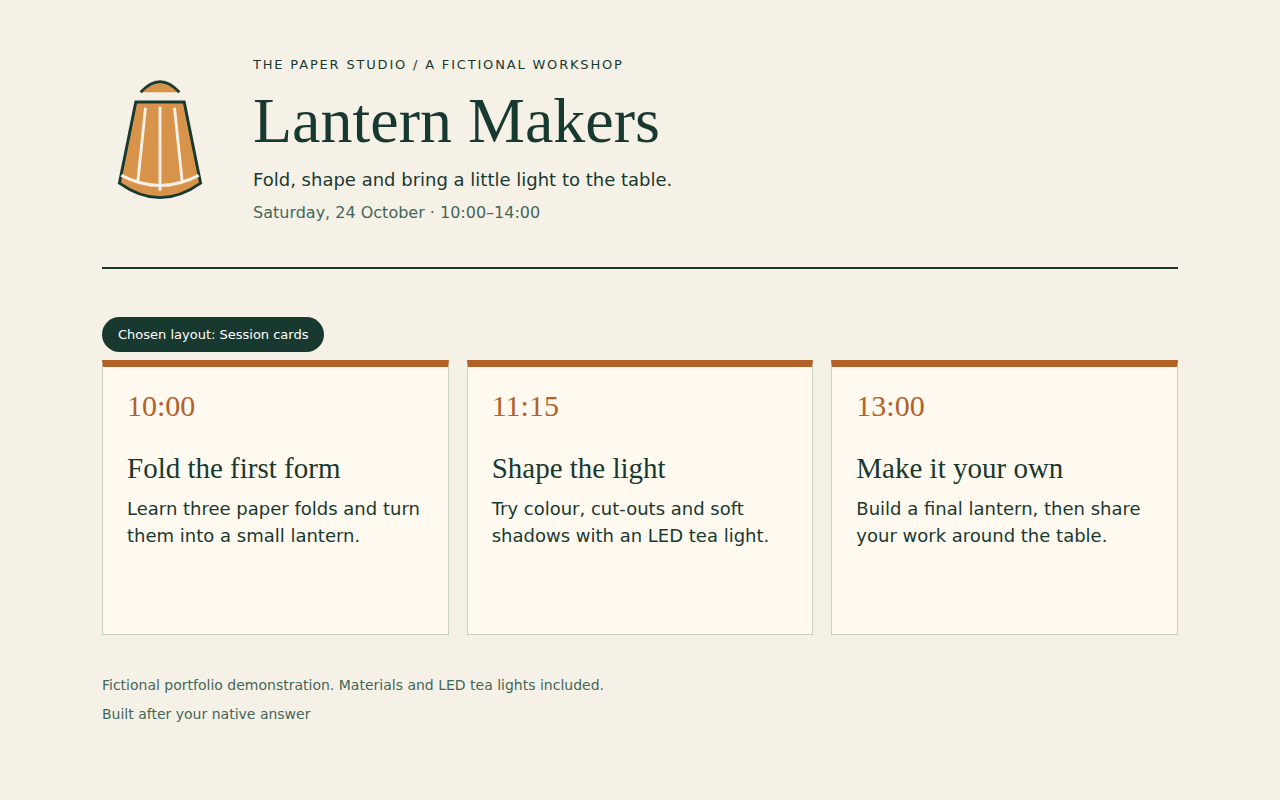
Choose a place. See what happens there.Interactive illustration of a recorded run. The choice and result are fixed; nothing is sent. The native answer was selected by automated Computer Use.
Recorded outcome: Session cards. The “Lantern Makers” ticket is an explanatory label, not a runtime identifier.
Watch the actual run · Inspect the actual page · Download the actual page · Public receipt · Full Attention provenance
An illustrated press. A real PNG made in your browser. Type a short headline, choose a look and pull a print. Change the draft for a second print: the first keeps its pixels. Keep this tab to return to your draft and two prints. Check the save status below.
The interactive press needs JavaScript. Open the Studio Lab for more controls and moving clips. Read the World map.
These three names appear separately in my project memory. What would justify treating them as one?
Real historical sample. Local search and download. The observatory is an illustration.
panelforge / built_with / vue
Original type: unknown (null)
Explore the panel-forge Laravel+Vue codebase
User wording in a discussion of live prompt modes and costing.
panelforge / built_with / vue-js
Original type: technology
No excerpt is published for this connection in this sample.
panelforge / built_with / vue-3
Original type: technology
No excerpt is published for this connection in this sample.
Similar names. Different records. This sample does not establish that they are interchangeable.
The interactive evidence desk needs JavaScript. Open the existing Memory Lab.
Recorded gateway result. Fictional local services. This desk builds a diagram; it sends no request.
Real gateway code. Fictional supporting services. Recorded outcome. This diagram performs no request. Local SVG diagram export requires JavaScript.
Listed tool. Policy denied.
HTTP 403 / access_denied · 0 observed backend tool calls
Fixture caller alias: Host.
No forwarded call; no backend identity was observed for this request.
Scout, Host and Limited caller are display aliases for this fixture, not real account names.
Recorded resource: Room Host.
A separate scope pass/fail event is not recorded.
0 upstream tool calls were observed for this request.
Recorded catalog host-catalog: search, queue_specific_song, set_volume.
set_volume appears in that recorded list.
HTTP 403 / access_denied: Room volume belongs to the venue operator
Case: host-volume-policy-denied. Recorded 2026-10-14, gateway v5.11.24.
HTTP 200. Tool call denied.
HTTP 200 / JSON-RPC -32602 · 0 observed backend tool calls
Fixture caller alias: Scout.
No forwarded call; no backend identity was observed for this request.
Scout, Host and Limited caller are display aliases for this fixture, not real account names.
Recorded resource: Soundtrack Scout.
A separate scope pass/fail event is not recorded.
0 upstream tool calls were observed for this request.
Recorded catalog scout-catalog: search.
queue_specific_song does not appear in that recorded list.
HTTP 200 / JSON-RPC -32602: Tool not available on this resource: queue_specific_song
Case: scout-queue-denied. Recorded 2026-10-14, gateway v5.11.24.
Resource access denied.
HTTP 403 / insufficient_scope · 0 observed backend tool calls
Fixture caller alias: Limited caller.
No forwarded call; no backend identity was observed for this request.
Scout, Host and Limited caller are display aliases for this fixture, not real account names.
Recorded resource: Room Host.
HTTP 403 / insufficient_scope: Resource requires one of: mcp:spotify.
This is the recorded resource denial. No separate tool-policy verdict is established.
Tool visibility: not established by this case. No catalog was recorded for this caller/resource pair.
HTTP 403 / insufficient_scope: Resource requires one of: mcp:spotify
Case: wrong-resource-scope. Recorded 2026-10-14, gateway v5.11.24.
One tool call forwarded
HTTP 200 · 1 observed backend tool call
Fixture caller alias: Scout.
Supplied claim: another fixture role; observed backend identity: authenticated Scout.
Scout, Host and Limited caller are display aliases for this fixture, not real account names.
Recorded resource: Soundtrack Scout.
A separate scope pass/fail event is not recorded.
1 upstream tool call was observed for this request.
Recorded catalog scout-catalog: search.
search appears in that recorded list.
HTTP 200. One upstream tool call was observed; this does not establish permission for other tools.
Case: scout-search. Recorded 2026-10-14, gateway v5.11.24.
Open the full Gateway Lab Read the original receipt Read the recorded transcript
The readable map
The world is a way in. Each district has a plain-language story and a route to the work behind it.
01 / The studio
PanelForge grew around the work after an image is made: finding it, keeping its references together, and trying another direction.
Workspaces, projects, scenes and panels give images, audio and documents a useful context.
Gallery assets can become chat references. The image handoff sits beside the place where its details are inspected.
Branch navigation, comparison and a preferred path keep revisions connected to their shared history.
Gallery walls hold actual screenshots of PanelForge. The model is an illustrated workspace; the screens show the real product.
02 / The engine room
Claude, Codex and OpenCode each have their own integration. The web workspace and Apple clients read a common stream of text and tool activity.
The engine adapters handle an agent SDK, app-server JSON-RPC and a typed OpenCode client. Each keeps its own session rules.
An actual engine run keeps working after its browser disconnects, then returns the stored answer. Runtime restart recovery has separate rules.
Attention returns an actual native layout choice to the same waiting Codex task. The resulting responsive page is available to inspect and download.
An actual Claude question waits for a recorded native choice, then the same invocation continues. The isolated build and its correction are disclosed.
A queued correction can reach a compatible tool boundary or follow-up turn, preserving the order of the instructions.
Three racks stand for three distinct runtimes. A device dock represents the clients that read their work.
03 / Connections
A shared MCP gateway connects agents to separate tool servers. Identity, resource scopes and tool profiles each answer a different access question.
Map a recorded requestAuthentication identifies the caller. Ownership rules and resource scopes govern access to capabilities.
A model-visible catalog and the engine’s enforced permissions have separate jobs. The native tool-profile exhibit makes that distinction tangible.
Recorded Trains MCP lookups bring a changed platform, delay and cancellation into one answer. Explore the historical sample data.
Stateful proxy support lets InfinitySketch and Freeform retain their session requirements behind the common gateway.
An actual Attention call reaches the Mac app, returns its choice to the original terminal, and changes the page it builds.
The central arch is the gateway. Branching tracks connect separate capabilities; they illustrate relationships, not live traffic.
04 / Memory observatory
Coding sessions can become a readable archive. PanelForge’s knowledge graph distils entities, beliefs and decisions from conversation history; FindThat retrieves a specific past detail.
Compare three namesExplore a real reviewed graph sample, inspect a relationship’s source, and try a reversible correction.
The knowledge graph connects entities, beliefs and decisions derived from the conversation archive. A relationship can lead back to its supporting conversation.
An actual type-scoped edit keeps its source links and records an immediate inverse. Inspect the fictional fixture and both audit batches.
An actual Photo Archive run reconstructs its derived index without changing thirteen canonical files. Verify the three synthetic PNG originals yourself.
A manual profile edit becomes version 2. Restoring the earlier wording creates version 3 and keeps both earlier snapshots.
FindThat chooses messages, tool calls or modifications to retrieve a specific command, error, edit or decision, then checks its source.
Archive shelves support a constellation of linked ideas. The constellation is a designed illustration, with no private records or invented live metrics.
05 / The workbench
metaclaude and metacodex hold portable agent configuration, skills and hooks. Machine-specific settings stay local; the working practices can travel.
Portable instructions, hooks, selected settings and reusable skills have one maintained home. Credentials and runtime data remain local.
Base configuration, local overlays and a doctor command let the workbench travel without copying a logged-in session.
Bosun controls agent panes. Helm gives Claude and Codex coordinators a shared report and handoff protocol, with a reviewed learning loop.
Two tabs can share an address and belong to different tasks. Follow a recorded handoff to the selected owner.
A separate screenshot gives the person reviewing a tool call a view of the page. Inspect the actual saved image.
Two terminal desks represent the two agent setups. The shared pegboard holds reusable skills; the layered drawers stand for configuration and local settings.
06 / Small useful things
A browser graphics maker. A growing handwritten page. An iPad photobooth. Focused tools with an obvious starting point and a useful result.
Make a printOne browser rendering function drives the preview, JPG and looping MP4. The photo stays in the browser.
The real waveform and timed-text components let you follow an original Danish story, seek and loop a passage. The narration is clearly labelled AI-generated.
A native iPad handwriting page where feedback sits beside the writing. Explore the separate decisions about when to review and when to show a note.
A conference notebook with reviewed analysis and an editable presentation output.
An iPad camera workflow turns a selfie into a collectible-figure style, then offers preview, email and printing.
A colourful print workshop, a writing desk and a camera station represent Kitforge, Pencil Page and Legobro.