A working preference changed from an outline to an example. Restoring the earlier wording created version 3; version 2 stayed available in history.
Actual PanelForge in an isolated test, using Mira Vale’s fictional profile. This records a manual edit and restore. No model or automatic refresh ran.
Version 1
Starting profile
Prefer a short written outline before changing a notebook page.
Version 2
Saved edit
Prefer a concrete page example before changing a notebook page.
Version 3
Restored from version 1
Prefer a short written outline before changing a notebook page.
Selected actual fixture text. The emphasis highlights the changed words; these are saved excerpts, not a live editor.
After reload, all three versions were still present.
Inspect the saved history
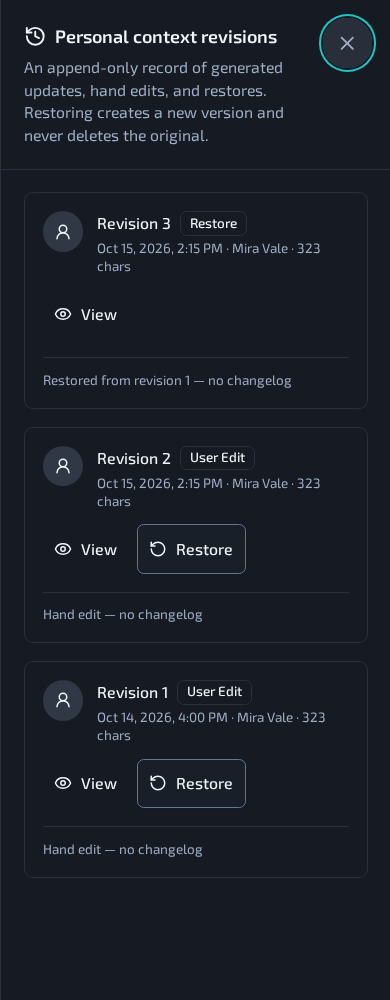
Open full size A 390px browser viewport after the desktop workflow and reload. This is browser emulation, not a physical-phone edit or restore. The capture is unchanged.
A new version, with a way back.
The history records version 3 as a restore from version 1. The saved edit remains as version 2, alongside the starting snapshot.
View opens the complete Markdown snapshot. Restore copies its wording forward; it does not rewind the version counter or erase the intervening edit.
Watch the 20-second edit and restore
The continuous, silent desktop recording saves version 2, views the complete version 1 snapshot, restores it as version 3, then reloads History. The real browser confirmation was accepted but is not visible in the headless recording. No confirmation UI was recreated.
The complete fictional version 1 profile and its first snapshot were seeded. One actual Settings Save created version 2; one actual Restore created version 3. The restored text matches version 1, and the original two snapshots remained unchanged.
The four separate authored context fields stayed unchanged. The seeded “synced” date is an evidence watermark, not a fresh sweep: manual edit and restore update the content-change timestamp instead.
This used unchanged PanelForge web-v10.20.97 in a disposable database, with unrelated jobs and external traffic intercepted. It exercises manual revision behavior, not automatic maintenance or live assistant-context use.
An offline source-service check separately confirmed the opt-in branches; no engine session was started.
I built a working brief with editable text, saved revisions and a restore path. Separate authored notes and opt-in settings govern how it becomes assistant context.
Source information sheet
Evidence, implementation & history Implementation inspected
What I checked
Profile, revision and refresh source inspected. The 15 October isolated UI proof used a complete fictional seed, one actual Save and a restore-forward retaining all three versions after reload. Source files were unchanged. No model, automatic refresh or provider session ran; refresh and context-inclusion capabilities remain source-backed rather than executed by this recording.
Release anchor: web-v10.20.97 (captured source).
Research cut: 15 October 2026. Source areas below are from panel-forge. Private conversation references are retained in the research ledger and are not published here.
Implementation decisions
The personal context service and refresh job maintain a short profile from evidence. Four separate authored context fields are user-only overrides; opt-in settings govern use as assistant context.
Each content-changing edit or restore stores a full snapshot and increments the profile version. A restore copies earlier text forward, retaining the intervening edit. The recorded example uses only a fictional profile and no automatic refresh.
A path through the feature
Inspect a saved revision
Open History and View to read the complete earlier snapshot. The current interface is a snapshot viewer, not a diff editor.
Restore as a new version
Copy the selected wording forward. The new version retains its lineage, while previous snapshots remain available after reload.
The recorded Settings workflow uses a complete fictional seed in the unchanged isolated application. One actual Save creates version 2; restoring the earlier full snapshot creates version 3 while retaining versions 1 and 2. Separate authored fields and the seeded evidence watermark stay unchanged. The native confirmation was accepted but is not painted in the headless recording. No model, refresh or provider session ran.
Recorded history
Dates describe the researched record, rather than today’s deployment.
 Open full size